
Native build tool
CMake는 빌드를 스스로 하려고 디자인된 도구가 아니다. 이는 실제 native build tool 파일을 생성한다. 그러므로 CMake를 사용할 때는 도구를 선택하고 필요하다면 설치해야 한다. 옵션 `-G <generator-name>`은 사용할 제너레이터의 타입을 지정할 때 사용된다. 만약 옵션이 없다면, CMake는 디폴트 제너레이터를 사용할 것이다. (예를 들어, nix 플랫폼이라면 `Unix Makefiles`)
사용 가능한 제너레이터 목록은 호스트 운영체제에 따라 달라진다(예: Visual Studio 계열 제너레이터는 Linux에서는 사용할 수 없다). 이 목록른 `cmake --help`명령을 통해 얻을 수 있다.
> cmake --help

...

Generators

The following generators are available on this platform (* marks default):
* Visual Studio 17 2022        = Generates Visual Studio 2022 project files.
                                 Use -A option to specify architecture.
  Visual Studio 16 2019        = Generates Visual Studio 2019 project files.
                                 Use -A option to specify architecture.
  Visual Studio 15 2017 [arch] = Generates Visual Studio 2017 project files.
                                 Optional [arch] can be "Win64" or "ARM".
  Visual Studio 14 2015 [arch] = Generates Visual Studio 2015 project files.
                                 Optional [arch] can be "Win64" or "ARM".
  Borland Makefiles            = Generates Borland makefiles.
  NMake Makefiles              = Generates NMake makefiles.
  NMake Makefiles JOM          = Generates JOM makefiles.
  MSYS Makefiles               = Generates MSYS makefiles.
  MinGW Makefiles              = Generates a make file for use with
                                 mingw32-make.
  Green Hills MULTI            = Generates Green Hills MULTI files
                                 (experimental, work-in-progress).
  Unix Makefiles               = Generates standard UNIX makefiles.
  Ninja                        = Generates build.ninja files.
  Ninja Multi-Config           = Generates build-<Config>.ninja files.
  Watcom WMake                 = Generates Watcom WMake makefiles.
  CodeBlocks - MinGW Makefiles = Generates CodeBlocks project files
                                 (deprecated).
  CodeBlocks - NMake Makefiles = Generates CodeBlocks project files
                                 (deprecated).
  CodeBlocks - NMake Makefiles JOM
                               = Generates CodeBlocks project files
                                 (deprecated).
  CodeBlocks - Ninja           = Generates CodeBlocks project files
                                 (deprecated).
  CodeBlocks - Unix Makefiles  = Generates CodeBlocks project files
                                 (deprecated).
  CodeLite - MinGW Makefiles   = Generates CodeLite project files
                                 (deprecated).
  CodeLite - NMake Makefiles   = Generates CodeLite project files
                                 (deprecated).
  CodeLite - Ninja             = Generates CodeLite project files
                                 (deprecated).
  CodeLite - Unix Makefiles    = Generates CodeLite project files
                                 (deprecated).
  Eclipse CDT4 - NMake Makefiles
                               = Generates Eclipse CDT 4.0 project files
                                 (deprecated).
  Eclipse CDT4 - MinGW Makefiles
                               = Generates Eclipse CDT 4.0 project files
                                 (deprecated).
  Eclipse CDT4 - Ninja         = Generates Eclipse CDT 4.0 project files
                                 (deprecated).
  Eclipse CDT4 - Unix Makefiles= Generates Eclipse CDT 4.0 project files
                                 (deprecated).
  Kate - MinGW Makefiles       = Generates Kate project files (deprecated).
  Kate - NMake Makefiles       = Generates Kate project files (deprecated).
  Kate - Ninja                 = Generates Kate project files (deprecated).
  Kate - Ninja Multi-Config    = Generates Kate project files (deprecated).
  Kate - Unix Makefiles        = Generates Kate project files (deprecated).
  Sublime Text 2 - MinGW Makefiles
                               = Generates Sublime Text 2 project files
                                 (deprecated).
  Sublime Text 2 - NMake Makefiles
                               = Generates Sublime Text 2 project files
                                 (deprecated).
  Sublime Text 2 - Ninja       = Generates Sublime Text 2 project files
                                 (deprecated).
  Sublime Text 2 - Unix Makefiles
                               = Generates Sublime Text 2 project files
                                 (deprecated).
컴파일러
Native build tool은 우리의 빌드를 조율하기만 할 뿐이며, 우리는 C++ 소스로부터 실제로 바이너리를 생성하는 컴파일러를 가지고 있어야 한다.
Visual Studio
Visual Studio의 컴파일러 `cl.exe`는 IDE와 함께 설치되므로, 별도의 추가 작업은 필요하지 않다.
Ubuntu GCC
GCC 컴파일러는 보통 Lilnux에서 사용된다. Ubuntu에 설치하려면 다음 명령어를 입력하면 된다.
sudo apt-get install -y gcc
Minimal example
cmake_minimum_required(VERSION 3.20)
project(foo) # Project를 `foo`로 선언하면, Visaul Studio에서는 `foo.sln`으로 이름을 가지게 된다

add_executable(foo foo.cpp)
CMake는 몇 가지 사전에 정의된 세팅을 가지고 있다. 그래서 다음과 같은 사항은 자동으로 처리된다.
- `*.cpp` 확장자는 C++ 소스 파일을 의미하므로, 타겟 `foo`는 C++ 컴파일러로 빌드된다.
- 윈도우에서는 보통 `.exe`를 접미사로 가지므로 결과로 생성되는 바이너리 이름은 `foo.exe`가 된다.
- OSX 또는 Linux같은 유닉스 플랫폼에서는 보통 접미사를 가지지 않으므로, 결과로 생성되는 바이너리 이름은 `foo`가 된다.
GUI로 native tool files 생성 및 빌드
1. Configure의 기반이 되는 경로와 Build될 결과가 저장될 디렉토리 경로 지정

Configure, Generate 결과확인
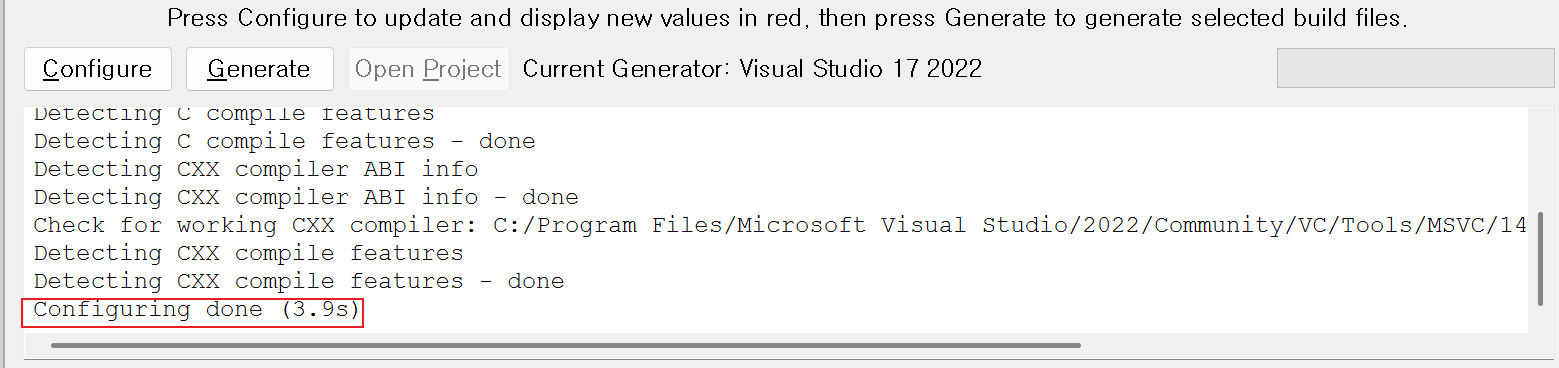
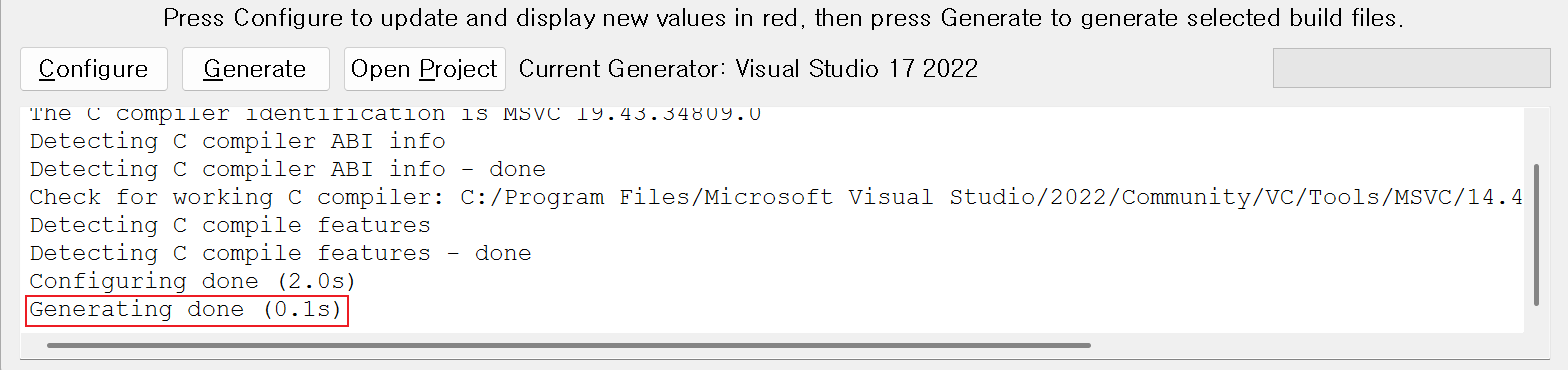
Generate가 완료되면 build 폴더에서 `foo.sln`가 생성된 것을 확인할 수 있다.
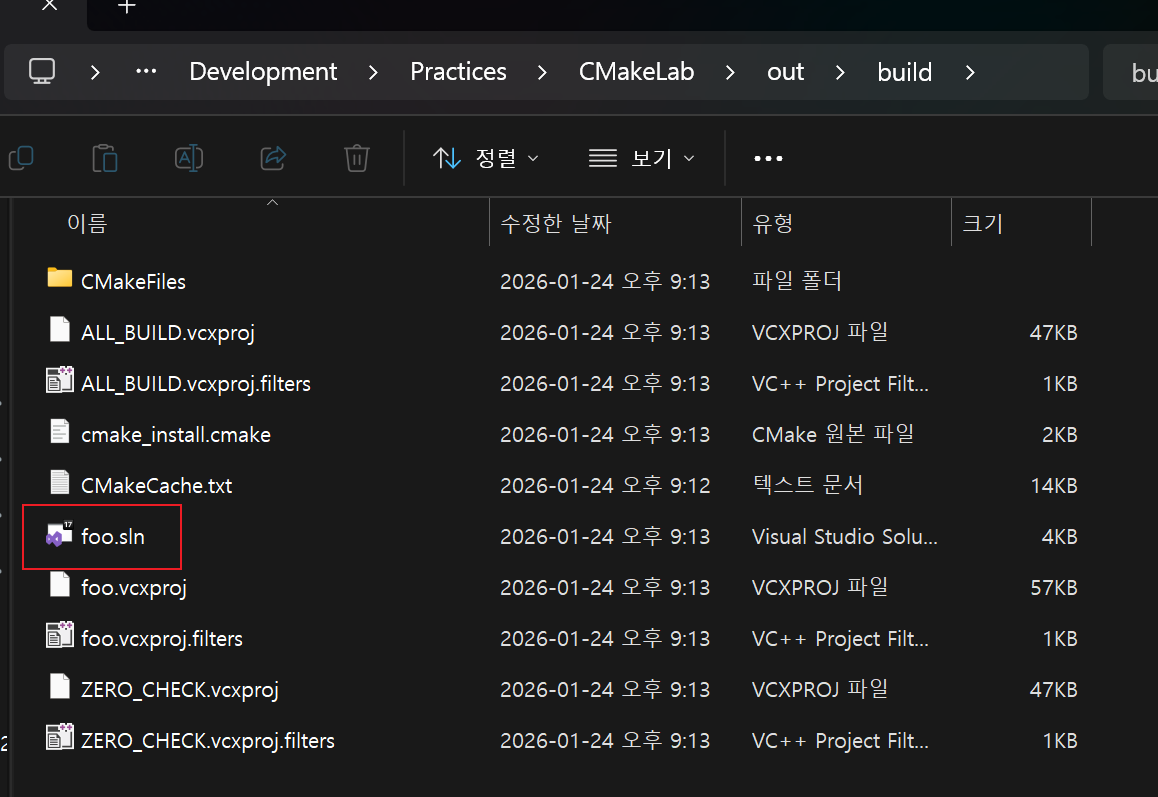
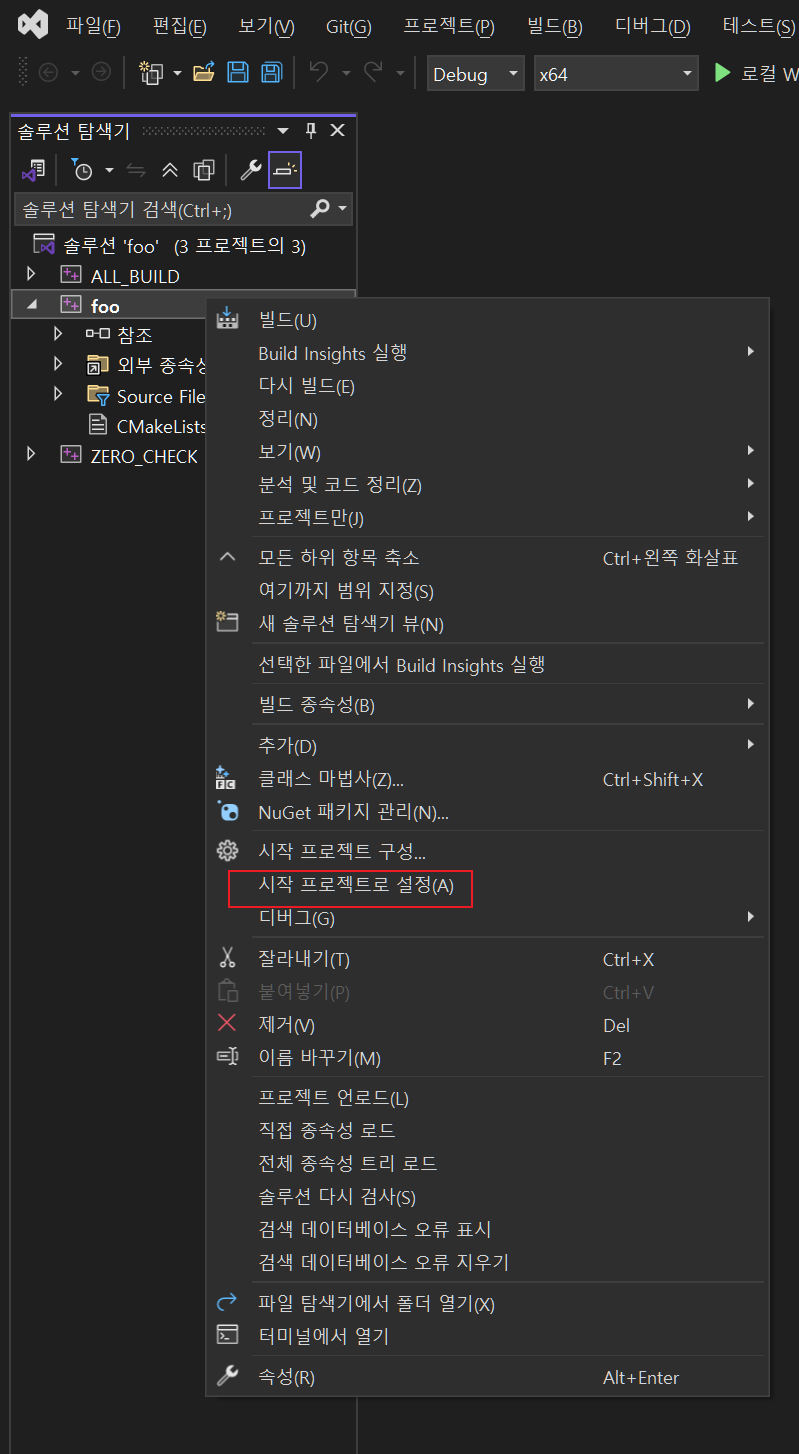
Sln파일을 열어서 프로젝트 시작 후 결과 확인

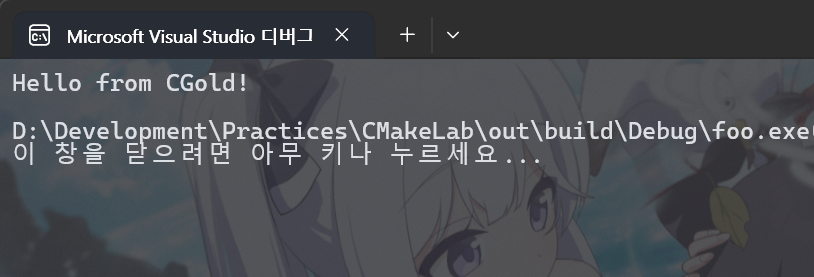
CLI로 native tool files 생성
경로 지정은 사용자의 환경에 맞춰 진행.
Configure + Generate
cmake -S . -B ../../out/build -G "Visual Studio 17 2022"
build
cmake --build ../../out/build
바이너리 실행
> ../../out/build/Debug/foo.exe
Hello from CGold!
CMake Stage
위에서 수행한 Configure와 Generate의 설명을 작성하자면 다음과 같다.
Configure 단계
이 단계에서는 소스 트리의 최상단에 있는 CMakeLists.txt를 해석하고 캐시 변수들로 채워진 CMakeCache.txt 파일을 생성한다. 다양한 종류의 변수들은 추후 설명될 예정이다. CMake-GUI 의 경우 `Configure` 버튼을 클릭함으로써 시작된다. CMake 명령줄 환경에서는 이 단계가 generate 단게와 합쳐지므로. configure와 generate라는 용어가 서로 같은 의미로 사용된다. 이 단계의 끝은 CMake가 출력하는 `Configuring done` 메시지로 알 수 있다.
Generate 단계
이 단계에서 CMake는 CMakeLists.txt에 정의된 정보와 CMakeCache.txt에 저장된 변수들을 사용하여 네이티브 빌드 도구 파일들을 생성한다. CMake-GUI에서는 `Generate` 버튼을 클릭하면 이 단계가 실행된다. CMake 명령줄 환경에서는 이 단계가
configure 단계와 함께 수행된다. 이 단계의 종료는 CMake가 출력하는 `Generating done`메시지로 알 수 있다.
CMakeCache.txt, Cache variables
최적화를 위해, 한 번의 CMake 실행에만 국한되지 않고 수명이 유지되는 특별한 종류의 변수들이 존재한다(일반적인 CMake 변수들과 달리). `CMakeCache.txt` 파일에 저장된 변수들은 프로젝트의 빌드 트리 내에서 여러 번의 CMake 실행에 걸쳐 지속적으로 유지된다. 이로 인해 CMake의 변경 사항이 잘 적용되지 않는 상황도 종종 생기는데, CMakeCache.txt를 살펴보거나 아예 지우는 것이 도움이 많이된다.
파일은 대략 이런 식으로 생겼다.
# This is the CMakeCache file.
# For build in directory: /home/jspark/Practices/CMake/build
# It was generated by CMake: /usr/local/bin/cmake
# You can edit this file to change values found and used by cmake.
# If you do not want to change any of the values, simply exit the editor.
# If you do want to change a value, simply edit, save, and exit the editor.
# The syntax for the file is as follows:
# KEY:TYPE=VALUE
# KEY is the name of a variable in the cache.
# TYPE is a hint to GUIs for the type of VALUE, DO NOT EDIT TYPE!.
# VALUE is the current value for the KEY.

########################
# EXTERNAL cache entries
########################

//Value Computed by CMake
BuildTypes_BINARY_DIR:STATIC=/home/jspark/Practices/CMake/build

//Value Computed by CMake
BuildTypes_IS_TOP_LEVEL:STATIC=ON

//Value Computed by CMake
BuildTypes_SOURCE_DIR:STATIC=/home/jspark/Practices/CMake/buildtype

//Path to a program.
CMAKE_ADDR2LINE:FILEPATH=/usr/bin/addr2line

//Path to a program.
CMAKE_AR:FILEPATH=/usr/bin/ar

//No help, variable specified on the command line.
CMAKE_BUILD_TYPE:STRING=Debug

//No help, variable specified on the command line.
CMAKE_CXX_COMPILER:FILEPATH=/usr/bin/g++-12

//A wrapper around 'ar' adding the appropriate '--plugin' option
// for the GCC compiler
CMAKE_CXX_COMPILER_AR:FILEPATH=/usr/bin/gcc-ar-12

//A wrapper around 'ranlib' adding the appropriate '--plugin' option
// for the GCC compiler
CMAKE_CXX_COMPILER_RANLIB:FILEPATH=/usr/bin/gcc-ranlib-12

//Flags used by the CXX compiler during all build types.
CMAKE_CXX_FLAGS:STRING=

//Flags used by the CXX compiler during DEBUG builds.
CMAKE_CXX_FLAGS_DEBUG:STRING=-g

//Flags used by the CXX compiler during MINSIZEREL builds.
CMAKE_CXX_FLAGS_MINSIZEREL:STRING=-Os -DNDEBUG

//Flags used by the CXX compiler during RELEASE builds.
CMAKE_CXX_FLAGS_RELEASE:STRING=-O3 -DNDEBUG

//Flags used by the CXX compiler during RELWITHDEBINFO builds.
CMAKE_CXX_FLAGS_RELWITHDEBINFO:STRING=-O2 -g -DNDEBUG

//No help, variable specified on the command line.
CMAKE_C_COMPILER:FILEPATH=/usr/bin/gcc-12

...
CMake에서 여럿 쓰이는 변수들이 보이는데, `CMAKE_BUILD_TYPE:STRING=Debug`, `CMAKE_CXX_COMPILER:FILEPATH=/usr/bin/g++-12` 등을 찾아볼 수 있다.
참고 자료
- https://cgold.readthedocs.io/en/latest/first-step/native-build-tool.html
- https://cgold.readthedocs.io/en/latest/first-step/compiler.html
- https://cgold.readthedocs.io/en/latest/first-step/compiler/ubuntu-gcc.html
- https://cgold.readthedocs.io/en/latest/first-step/minimal-example.html
- https://cgold.readthedocs.io/en/latest/first-step/generate-native-tool.html
- https://cgold.readthedocs.io/en/latest/tutorials/cmake-stages.html
'패키지 설치 및 빌드 시스템 > CMake' 카테고리의 다른 글
| [CMake] if 명령 조건 활용 방식 (0) | 2026.02.04 |
|---|---|
| [CMake Study] 1. Overview - What CMake can do (0) | 2026.01.21 |
| [CMake] install (0) | 2025.09.05 |
| [CMake] ExternalProject_Add() 사용 연습 (0) | 2025.04.24 |
| [CMake] .cmake 파일의 사용 (0) | 2025.04.23 |